Sales Pipeline for Financial Advisors: How to Design One That Turns Leads Into Clients
Most advisory firms have a pipeline. Fewer have one they trust. Open it on a Monday morning and it should tell you who needs a call, who is waiting for a first meeting and how much new business is on the way. Too often it tells you none of that. There are too many stages, a few stages where contacts pile up for years, and enough junk records to make every conversion rate look worse than it is.
A good sales pipeline is a structured view of how prospects move from first interest to becoming clients, with clear stages, clear owners and a clear next step for every contact. This guide walks through how to design one for an advisory firm, how to tell if it is healthy, and how to work it faster. It is based on our LeadCenter University webinar, From Leads to Clients: Smarter Sales Pipeline Design and Management with AI.
See your pipeline in LeadCenter
What your pipeline is for
A pipeline serves three groups at once, and a good design works for all of them.
- Management: measure contact quality and conversion, spot bottlenecks, coach the team and forecast new business.
- Schedulers and advisors: reach new contacts quickly, qualify their needs and follow up until they book.
- The whole firm: clear hand-offs between marketing, advisors and operations, from first contact to a funded account.
Firms focused on growth often run a weekly pipeline review. Your pipeline should give you the numbers for that meeting without anyone building a report by hand.
Agree on the definitions first
Pipelines get messy when marketing, schedulers and advisors use the same words to mean different things. Write these down and share them with every team.
| Term | What it means |
| Ideal client profile | The clients your firm serves best, defined by investable assets, life stage, financial needs and service fit. |
| MQL (marketing qualified lead) | A prospect who fits your ideal client profile and has shown interest, such as attending a seminar or requesting a retirement guide. No one has spoken to them yet. |
| SQL (sales qualified lead) | A prospect your team has spoken to and confirmed as a financial fit, with a need for advice and a readiness to talk about working with you. |
| Stage | Where the prospect is in your process, such as Attempting, Discovery Call or 1st Appointment. |
| Open or closed | Whether you are still pursuing the prospect (open) or the pursuit has reached an outcome: won, lost or inactive (closed). |
| Medium | How the contact entered your CRM: a form, a phone call, an event registration or a calendar booking. |
| Source | The marketing channel that brought the contact in, such as referral, paid search, social media or a seminar. Track it with sources, not stages. |
| Expected production | An estimate of the new business the prospect could bring, such as assets under management or annuity premium, entered after a discovery call or first appointment. |
| Owner | The person accountable for the next step at the contact's current stage. |
Two dates are easy to confuse. Came at is when the contact first came into your CRM. Updated at is when the record last changed, which is not necessarily the last time anyone spoke to the prospect.
Medium is worth tracking. Some firms find that contacts who fill in a form convert better than those who call, and you can only see that if you record how each contact arrived.
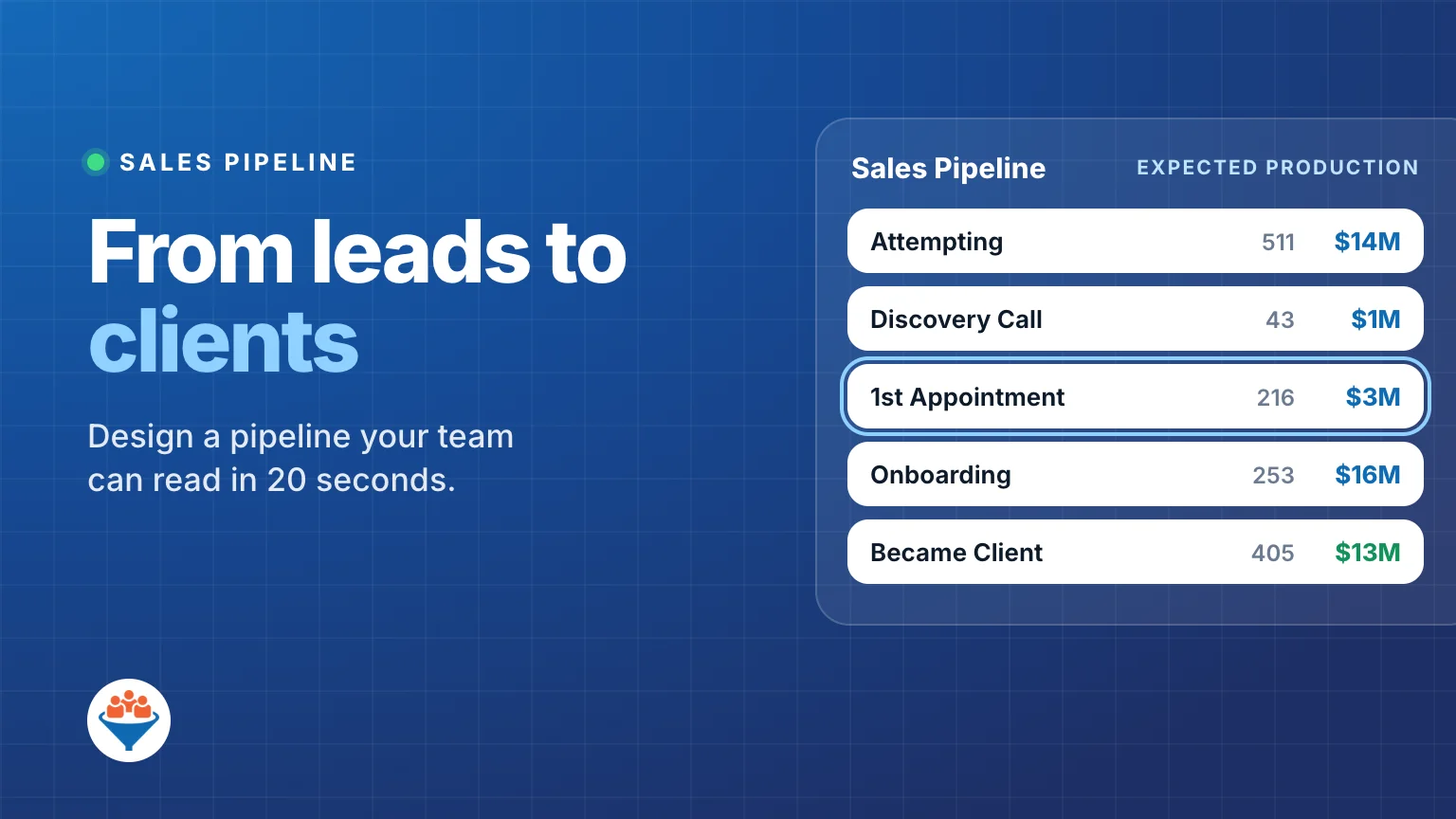
The 20-second test
Open your pipeline and time yourself. You should be able to answer these five questions in about 20 seconds:
- Awaiting outreach: how many new contacts has no one called yet?
- First appointments booked: how many prospects are waiting for their first meeting, and what is their expected production?
- Moving forward: how many have completed a first appointment and moved on to a second, third or fourth?
- Onboarding: how many have agreed to become clients, and what is their expected production? This is your forecast.
- Stalled: where are prospects stuck, for how long, and who owns the next step?
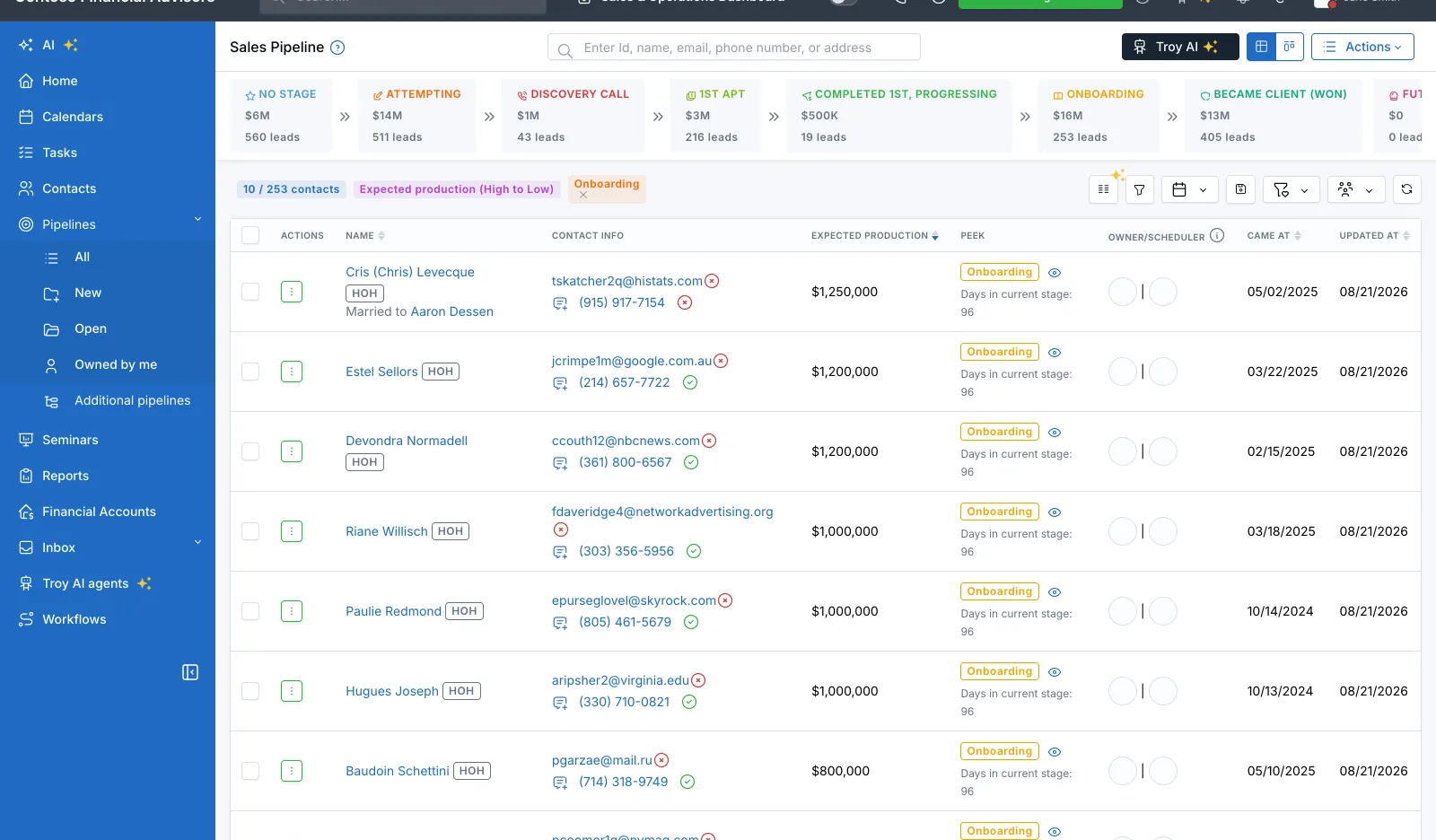
In LeadCenter, the totals at the top of each stage show the number of contacts and their expected production, in both the board and table views. If you cannot answer the five questions quickly, the usual cause is too many stages.
Design stages around your teams
Build the pipeline around five functions, even if one person covers several of them today: marketing, scheduling, sales, onboarding and servicing.
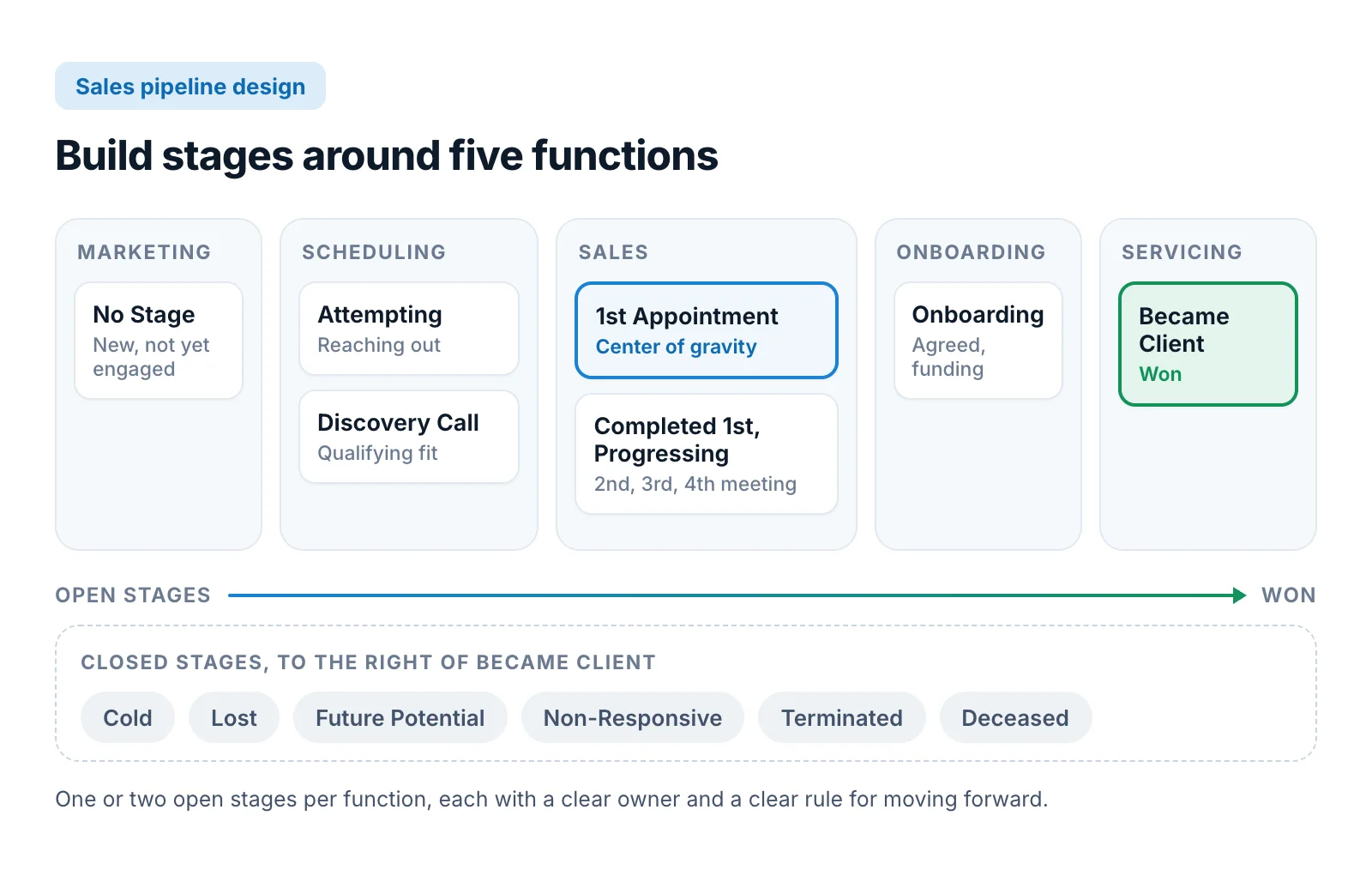
A few rules keep it readable:
- One or two open stages per function, each with a clear owner and a clear rule for moving forward.
- Open stages on the left, closed stages on the right, with Became Client (Won) in between. You see every open stage without scrolling.
- Give First Appointment its own stage. It is the center of gravity of the pipeline and the best place to measure conversion.
- Let workflows move contacts for you, for example to 1st Appointment as soon as one is booked.
- Use filters, not stages, for exceptions. A no-show or a reschedule stays in 1st Appointment and is found with a filter.
Avoid parking lot stages
A parking lot is an open stage where contacts pile up with no owner, no next step and no progress. It makes the pipeline look bigger and healthier than it really is.
Open stages should hold tens or hundreds of contacts, not thousands. Thousands of contacts in one open stage usually means they have gone cold. Move them to a closed stage and into a nurture process. Marketing can still email them and invite them to events, and schedulers can bring them back when they show interest again.
Check pipeline health
A healthy pipeline looks like an inverted pyramid: many contacts in the early stages, fewer in each stage after that.
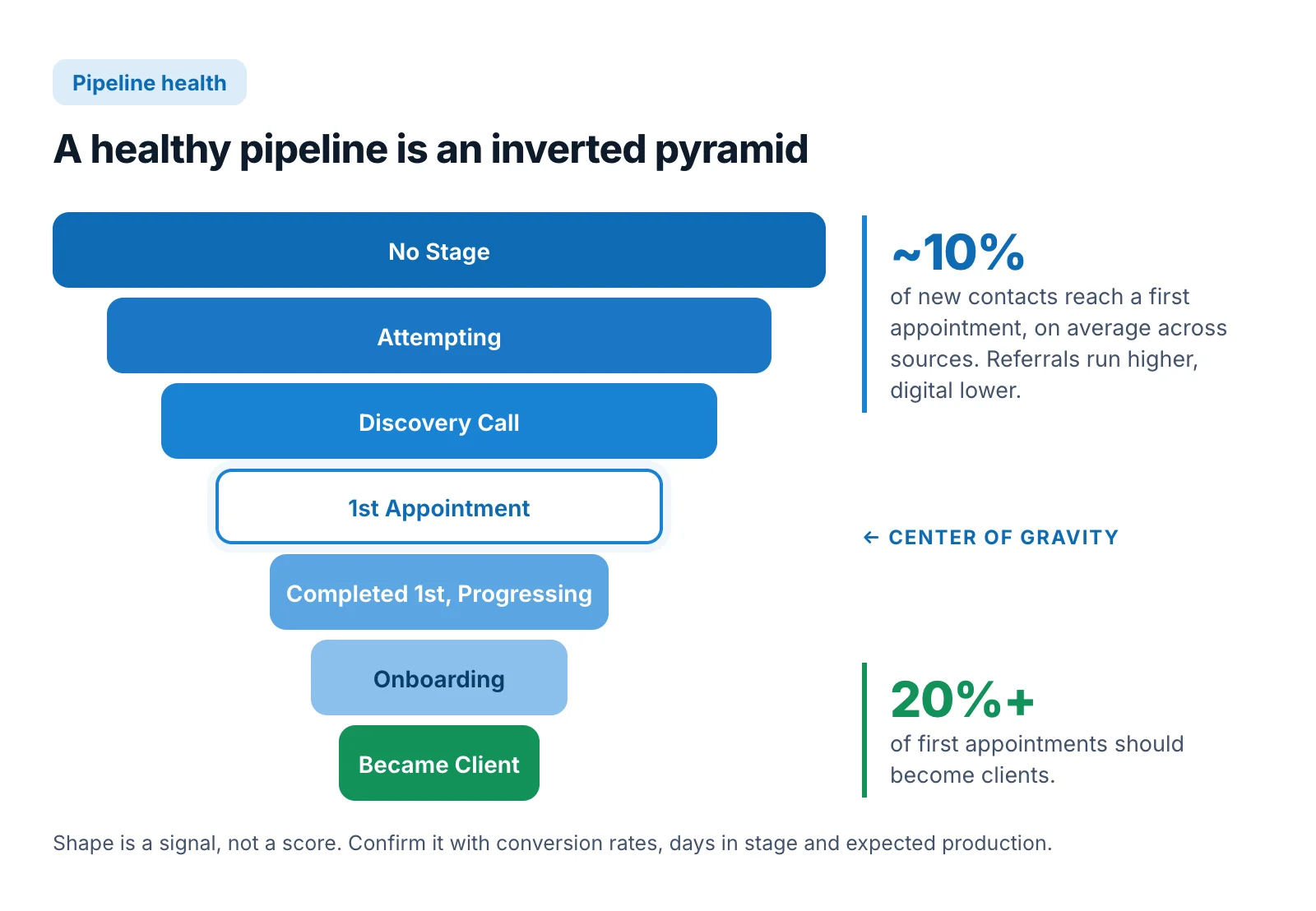
When the shape is off, it usually points to a specific problem:
| What you see | What it usually means |
| Too few at the top | Not enough new contacts to support future growth. Invest in marketing. |
| Too many in one stage | Slow follow-up, a missed hand-off or an unclear next step. |
| Too many near the bottom | Stalled decisions, funding delays or outdated opportunities. |
| Contacts sitting too long | Give each one an owner, a next step and a follow-up date, or move it out of the open pipeline. |
Shape is a signal, not a score. Confirm it with conversion rates, days in stage and expected production. As a rough guide, about 10% of new contacts reach a first appointment on average across sources, with referrals much higher and digital sources lower. From first appointment, aim for 20% or more to become clients.
Use closed stages to explain outcomes
Closed stages matter as much as open ones. They record why a prospect stopped moving, keep your conversion reporting accurate and show who is worth reaching out to again.
| Stage | State | When to use it |
| Cold | Closed, inactive | No current buying intent. Marketing keeps nurturing while scheduling and sales outreach pause. |
| Lost | Closed, lost | Met with an advisor but decided not to go ahead or chose another firm. Record the reason. |
| Future Potential | Closed, inactive | Has a future need but is not ready. Record the reason and set a date to reconnect. |
| Non-Responsive | Closed, inactive | Never met with an advisor and still unreachable after your follow-up process, including unresolved no-shows. |
| Terminated | Closed, lost | A past client who ended the relationship for a reason other than death. Record why. |
| Deceased | Closed, lost | A past client who passed away. Track separately and stop automated prospect outreach. |
Closed means the active pursuit has ended, not that all contact should stop.
Delete or mark as spam. Remove records that don’t belong in the pipeline at all. Delete invalid or unusable records, such as contacts with no usable details. Mark bot submissions, fraudulent inquiries and unsolicited promotions as spam, so future emails and calls from them go to the spam folder. Both move to their own folders and can be restored, and both stop junk from dragging down your conversion rates.
Work the pipeline faster
A well designed pipeline still needs to be worked every day. These are the habits that save the most time in LeadCenter.
Choose your columns and sort by what matters. In table view, add columns such as days in current stage, owner, scheduler, created date, estimated investable assets and email and phone validity. Sort by expected production so schedulers call the biggest opportunities first, or by created date to reach the newest contacts while they are still warm.
Peek before you open. Peek shows a contact’s details, accounts and latest tasks without leaving the pipeline. You can then email or text from a template, call, add a note, create a task or book an appointment from the same screen.
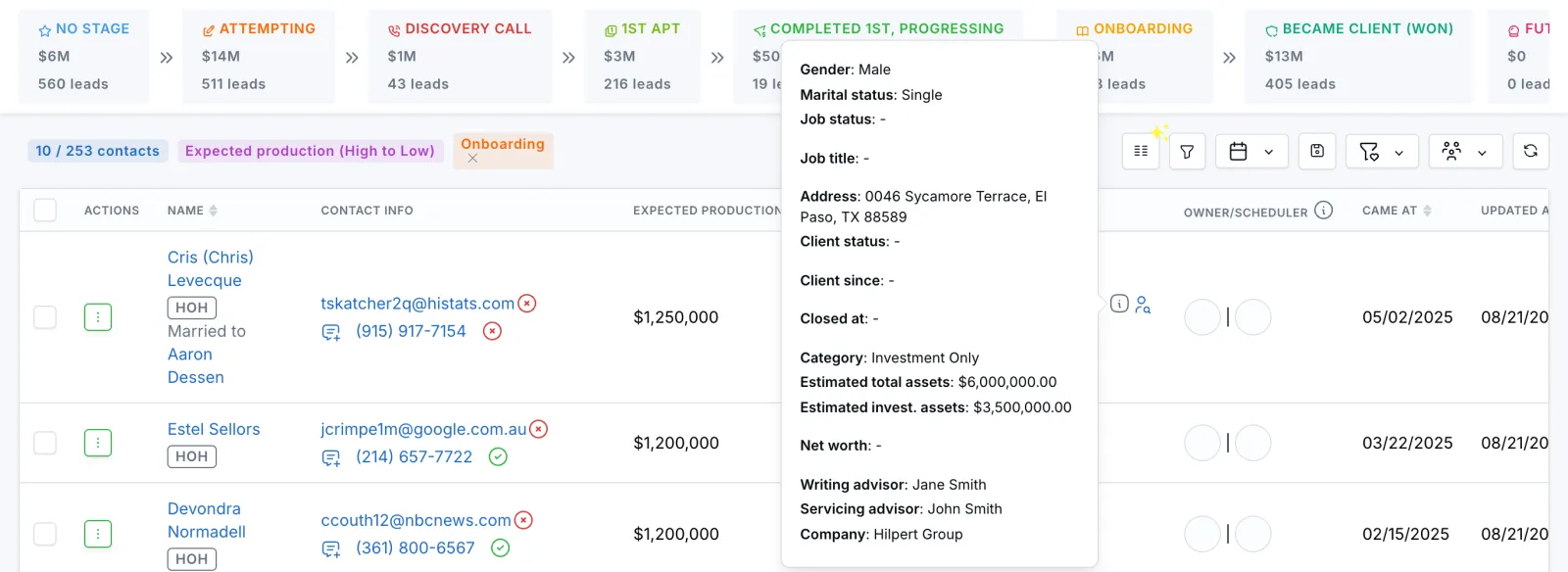
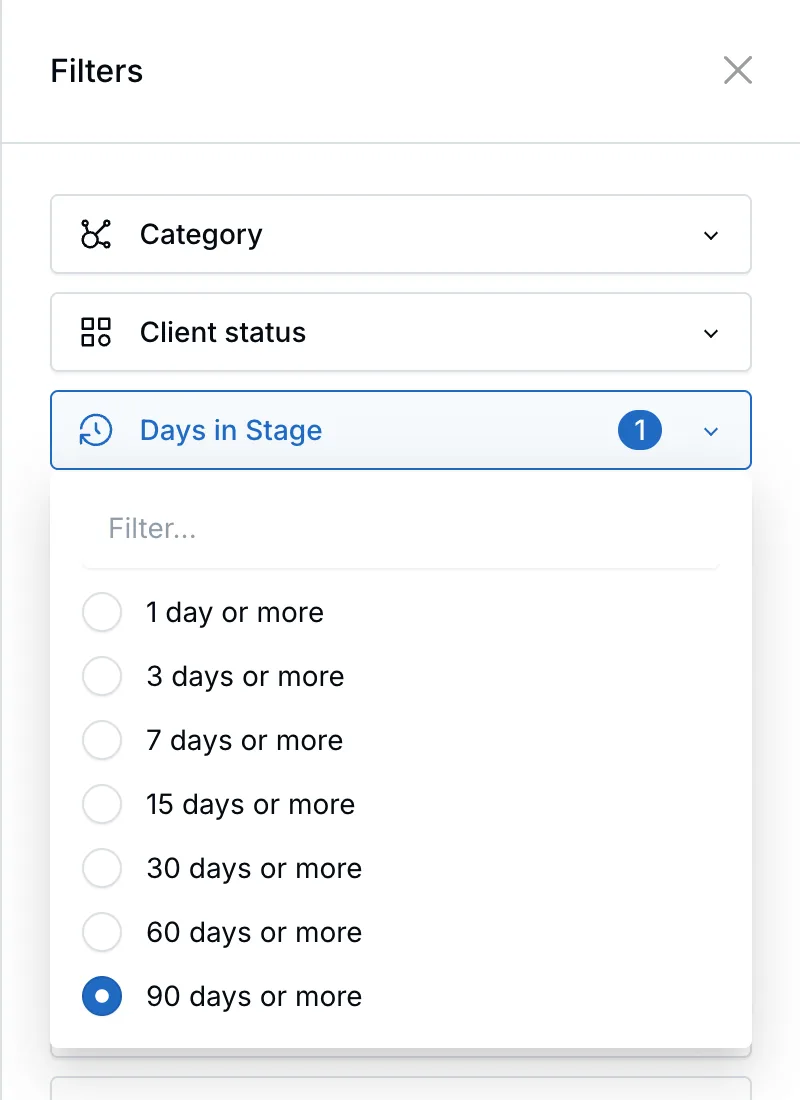
Filter for stalled contacts. Combine stage with days in stage, appointment category or appointment status. For example, show contacts who have been in 1st Appointment for 90 days or more. Save the filter for your weekly review, or turn it into a segment for a campaign.
Track production between first appointment and client. Before an account exists, use expected production. After the first or second appointment, create a pending financial account, and expected production updates automatically. When the account is issued, it feeds the Production Report. Once a contact becomes a client, manage withdrawals and required minimum distributions with task lists and workflows, not the pipeline.
Ask AI which contacts to call first
Because LeadCenter holds the whole client journey, Troy AI can look at form submissions, email opens and clicks, calls, texts, Catchlight data and notes together. That makes it useful for the question every scheduler asks on Monday morning.
Open Troy AI from the pipeline and ask, for example: “Which contacts in the Discovery Call stage are most likely to convert if I contact them today?” Troy AI returns an analysis, the contacts to call in order and a suggested focus for each conversation.
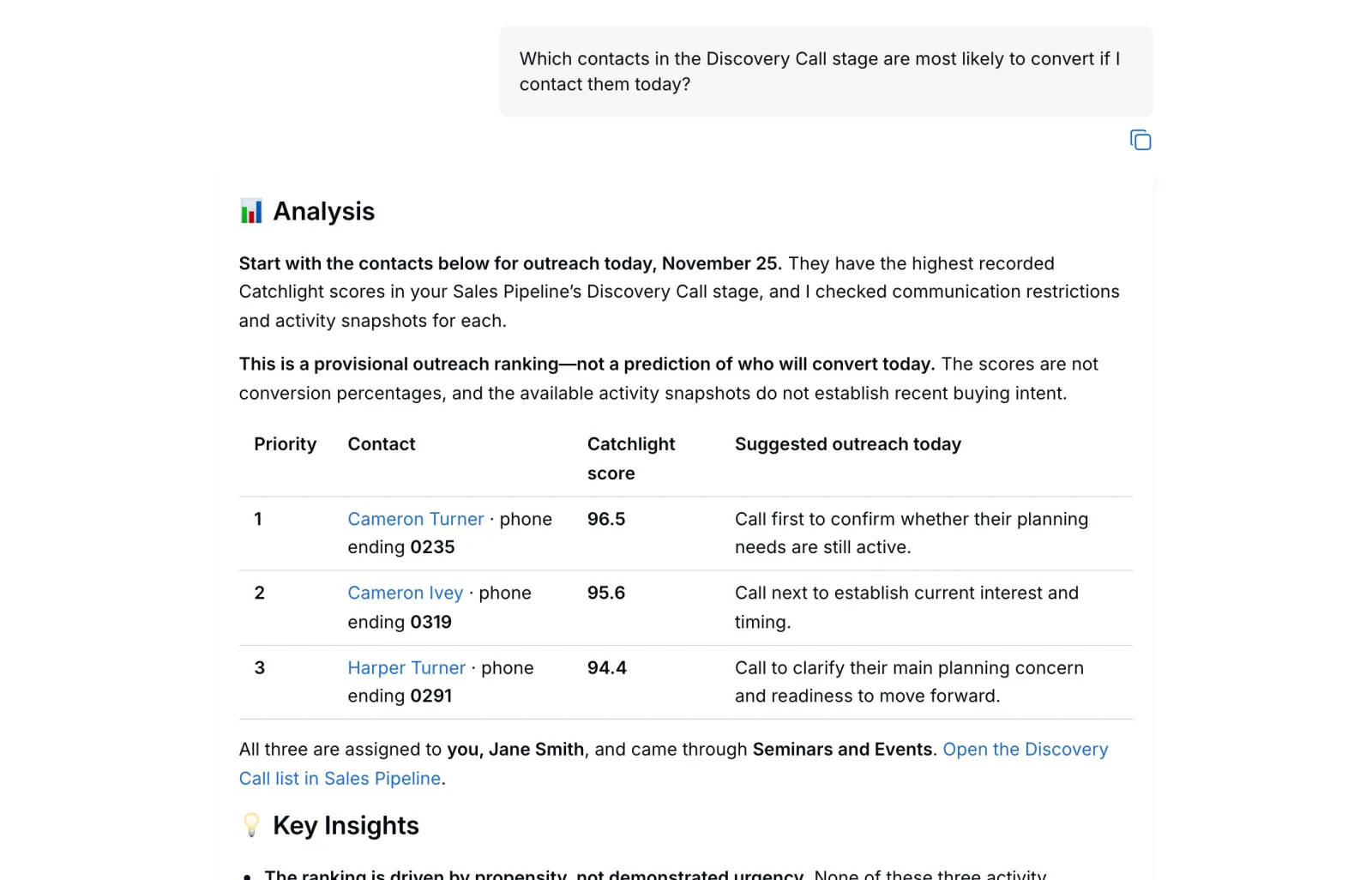
Save the answer as a note or ask Troy AI to create the follow-up tasks. Prompts your team uses often can be saved as templates under Marketing Dashboard > AI Templates. To run a routine like this on a schedule without anyone asking, use AI agents.
Review the month with the Sales Pipeline Report
For monthly reviews, open the Sales Pipeline Report. It brings pipeline, appointment and production data together, so you can see how many contacts came in, how many reached a first appointment, how many kept it and how many became clients.
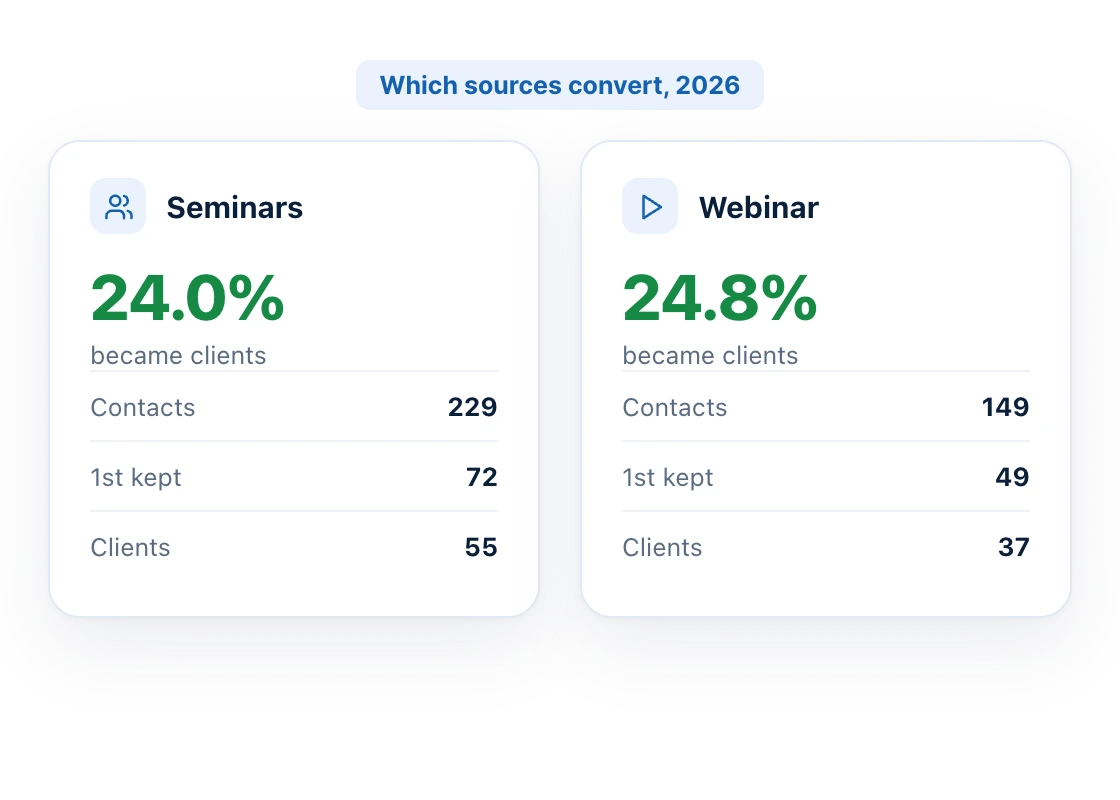
Filter by source, such as seminars or webinars, to see where each source sits in the pipeline, and switch between contact counts and expected production. The Sales Pipeline Report overview walks through it.
Your pipeline checklist
Run through this list with your team this week:
- Your ideal client profile, MQL and SQL definitions are written down and shared.
- You can answer the five questions of the 20-second test.
- Every open stage has an owner and a clear rule for moving forward.
- No open stage holds thousands of contacts.
- 1st Appointment is its own stage, and you know its conversion rate.
- Closed stages record why a prospect stopped moving.
- Invalid records are deleted and spam is marked as spam.
- A saved filter shows stalled contacts for your weekly review.
Frequently asked questions
How many stages should a financial advisor’s sales pipeline have?
Aim for one or two open stages per function: marketing, scheduling, sales and onboarding. That usually means six or seven open stages plus Became Client. If you cannot read your pipeline in about 20 seconds, merge stages.
What is the difference between an MQL and an SQL?
An MQL fits your ideal client profile and has shown interest, but no one has spoken to them. An SQL is a prospect your team has spoken to and confirmed as a financial fit with a need for advice.
Should no-shows and reschedules get their own stage?
No. Keep them in 1st Appointment and find them with a filter on appointment status. Extra stages for exceptions make the pipeline harder to read and the conversion numbers harder to trust.
What is a good conversion rate for an advisory firm’s pipeline?
As a rough guide, about 10% of new contacts reach a first appointment on average across sources, and 20% or more of first appointments become clients. Referrals convert much better than digital sources, so compare each source on its own.
See it in your own pipeline
Watch the full From Leads to Clients webinar recording for a live walkthrough, or see how LeadCenter handles pipeline management.
Need help designing your pipeline? Email support@leadcenter.ai.